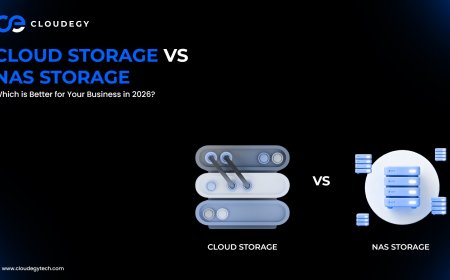












Cloud Storage vs Local Storage: Which One Actually Works Better for Your Business in 2026?
Choosing the right data storage solution is one of the most important decisions for any business today.

With increasing data volumes, remote work demands, and security concerns, businesses often face a common question:
Should we use cloud storage or local storage?
Both options have their own advantages and limitations. The right choice depends on your business needs, budget, and long-term goals.
In this guide, we’ll break down the differences between cloud storage and local storage to help you make the right decision.
What is Cloud Storage?
Cloud storage allows you to store data on remote servers managed by third-party providers. You can access your files anytime using the internet.
Key Features:
• Remote access
• Scalable storage
• Pay-as-you-go pricing
• Built-in backup
Cloud storage is widely used for flexibility and collaboration.
What is Local Storage?
Local storage refers to storing data on physical devices such as:
• Hard drives
• Servers
• USB drives
• NAS systems
Data is stored on-site and managed internally by the business.
Key Differences Between Cloud Storage and Local Storage
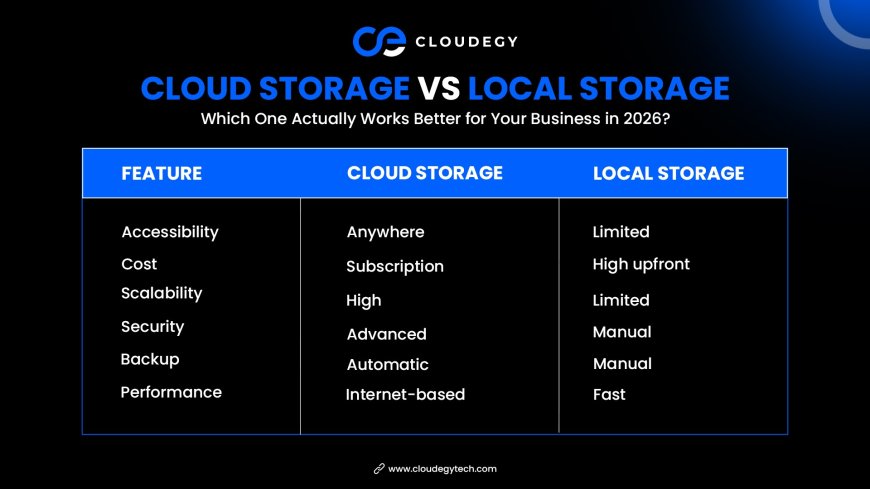
1. Accessibility
Cloud Storage:
• Access files from anywhere
• Works across devices
• Ideal for remote teams
Local Storage:
• Access limited to physical location
• Requires direct connection
• Not ideal for remote work
👉 Cloud storage offers superior accessibility.
2. Cost
Cloud Storage:
• Subscription-based
• No hardware investment
• Scales with usage
Local Storage:
• High upfront cost
• Maintenance expenses
• Hardware upgrades required
👉 Cloud storage is more cost-efficient for growing businesses.
3. Scalability
Cloud Storage:
• Easily scalable
• Add or reduce storage instantly
Local Storage:
• Limited by hardware
• Requires physical upgrades
👉 Cloud storage wins in scalability.
4. Security
Cloud Storage:
• Encryption
• Access control
• Regular updates
Local Storage:
• Full control
• Risk of physical damage
• Requires manual security setup
👉 Both can be secure, but cloud providers offer advanced built-in protection.
5. Backup and Recovery
Cloud Storage:
• Automatic backups
• Disaster recovery options
Local Storage:
• Manual backups
• Risk of data loss
👉 Cloud storage provides better backup solutions.
6. Performance
Cloud Storage:
• Depends on internet speed
• Slight latency possible
Local Storage:
• Faster access
• No internet dependency
👉 Local storage performs better for high-speed offline tasks.
Comparison Table
Advantages of Cloud Storage
1. Remote Access
Work from anywhere without restrictions.
2. Easy Collaboration
Teams can share and edit files in real time.
3. Cost Savings
No need for expensive infrastructure.
4. Automatic Updates
No manual maintenance required.
5. Disaster Recovery
Data remains safe even during system failures.
Advantages of Local Storage
1. Full Control
Businesses manage their own data.
2. Faster Performance
No dependency on internet speed.
3. One-Time Investment
No recurring subscription fees.
4. Offline Access
Works without internet connectivity.
When Should You Choose Cloud Storage?
Cloud storage is best when:
• You have remote teams
• You need scalability
• You want cost flexibility
• You prioritize collaboration
When Should You Choose Local Storage?
Local storage is ideal when:
• You need high-speed processing
• You handle sensitive data internally
• You operate in low-connectivity areas
Hybrid Approach: The Best of Both Worlds
Many businesses today use a hybrid model.
This means:
• Critical data stored locally
• Backup and collaboration handled via cloud
This approach offers flexibility, security, and performance.
Common Mistakes to Avoid
Ignoring Security
Both systems require proper protection.
Not Planning Future Growth
Choose a solution that can scale.
Overlooking Backup
Always have a backup strategy.
Choosing Based on Cost Only
Consider long-term value, not just price.
Future of Data Storage
The future of storage is evolving rapidly with:
• AI-powered storage systems
• Edge computing
• Multi-cloud environments
• Advanced encryption
Cloud storage is expected to dominate due to its flexibility and scalability.
Why Cloud Storage is Becoming the Preferred Choice
Businesses are shifting toward cloud storage because it:
• Reduces operational complexity
• Supports remote work
• Enhances collaboration
• Ensures data security
Cloud solutions align better with modern business needs.
Conclusion
Both cloud storage and local storage have their strengths.
However, in today’s digital landscape, cloud storage offers more flexibility, scalability, and convenience.
For most businesses, especially growing ones, cloud storage is the smarter long-term choice.
Still, the best solution depends on your specific needs.
If possible, consider a hybrid approach to maximize benefits.
What's Your Reaction?
 Like
0
Like
0
 Dislike
0
Dislike
0
 Love
0
Love
0
 Funny
0
Funny
0
 Angry
0
Angry
0
 Sad
0
Sad
0
 Wow
0
Wow
0