













Cloud Backup vs Cloud Storage: What’s the Real Difference & Which One Does Your Business Actually Need?
In today’s data-driven world, businesses rely heavily on digital files, applications, and databases. But managing and protecting this data is where many companies get confused.

Two terms often used interchangeably are cloud backup and cloud storage.
While they may sound similar, they serve very different purposes.
Understanding the difference between cloud backup and cloud storage is essential for building a secure and efficient data strategy.
In this guide, we’ll break down both concepts, compare them, and help you choose the right solution for your business.
What is Cloud Storage?
Cloud storage is a service that allows you to store, access, and manage files online.
It is designed for:
• File storage
• Sharing and collaboration
• Easy access from multiple devices
Key Features:
• Upload and organize files
• Share documents with teams
• Access data anytime
• Sync across devices
Cloud storage is ideal for daily business operations.
What is Cloud Backup?
Cloud backup is a service that automatically copies and stores your data in a secure cloud environment.
Its main purpose is:
• Data protection
• Disaster recovery
• Data restoration
Key Features:
• Automatic backups
• Data recovery options
• Version history
• Secure storage
Cloud backup ensures your data can be recovered if lost.
Key Differences Between Cloud Backup and Cloud Storage
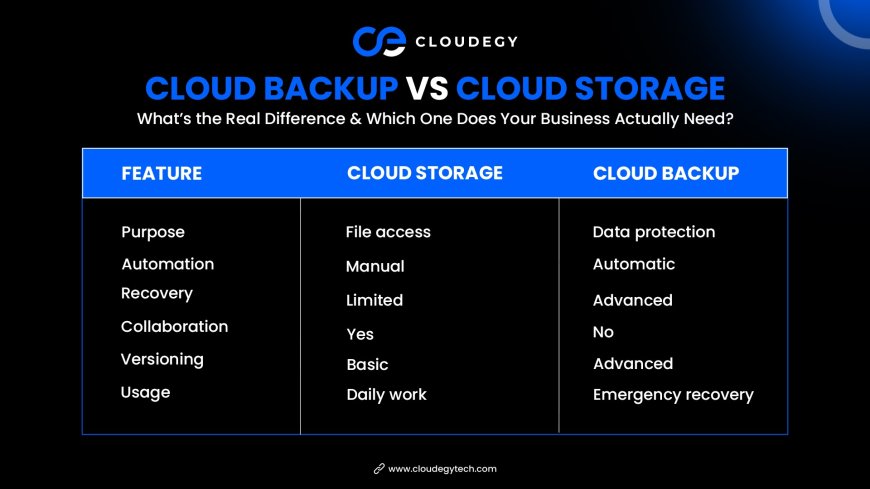
1. Purpose
Cloud Storage:
Used for managing and accessing files.
Cloud Backup:
Used for protecting and recovering data.
👉 Storage = Access
👉 Backup = Protection
2. Data Handling
Cloud Storage:
• Files are uploaded manually
• Users manage files directly
Cloud Backup:
• Data is copied automatically
• No manual intervention needed
3. File Access
Cloud Storage:
• Easy access and editing
• Real-time collaboration
Cloud Backup:
• Limited access
• Used mainly for recovery
4. Automation
Cloud Storage:
• Manual uploads
Cloud Backup:
• Automated backup processes
5. Data Recovery
Cloud Storage:
• Basic recovery options
Cloud Backup:
• Full system recovery
• Point-in-time restore
6. Version Control
Cloud Storage:
• Limited version history
Cloud Backup:
• Multiple backup versions
• Restore previous data states
Comparison Table
Advantages of Cloud Storage
1. Easy File Access
Access files anytime from anywhere.
2. Team Collaboration
Share and edit documents in real time.
3. Scalability
Increase storage as needed.
4. Cost Efficiency
Pay only for what you use.
5. Organized File Management
Keep files structured and searchable.
Advantages of Cloud Backup
1. Data Protection
Protects against data loss, cyberattacks, and system failures.
2. Automatic Backup
No need to remember manual backups.
3. Disaster Recovery
Quickly restore lost or damaged data.
4. Version History
Recover previous versions of files.
5. Business Continuity
Ensures operations continue during disruptions.
When Should You Use Cloud Storage?
Cloud storage is best for:
• Daily file access
• Team collaboration
• Document sharing
• Remote work
When Should You Use Cloud Backup?
Cloud backup is essential when:
• You need data protection
• You want automatic backups
• You require disaster recovery
• You manage critical business data
Why Businesses Need Both
The smartest approach is not choosing one over the other—but using both together.
Example Strategy:
• Use cloud storage for daily operations
• Use cloud backup for data protection
This combination ensures:
✅ Easy access
✅ Secure data
✅ Full recovery options
Real-World Scenario
Imagine a company storing files in the cloud.
Without Backup
❌ Data loss due to ransomware
❌ No recovery options
❌ Business disruption
With Backup
✅ Data restored instantly
✅ Minimal downtime
✅ Business continuity maintained
Common Mistakes to Avoid
Thinking Storage = Backup
They are not the same.
Not Backing Up Critical Data
Always have a backup plan.
Relying Only on Manual Processes
Automation reduces risk.
Ignoring Security
Both storage and backup need protection.
Best Practices for Businesses
To maximize benefits:
• Use both storage and backup
• Automate backups
• Encrypt sensitive data
• Monitor systems regularly
• Test recovery processes
Future of Cloud Data Management
Cloud technology is evolving with:
• AI-based backup systems
• Real-time data protection
• Zero-trust security
• Multi-cloud environments
Businesses adopting these technologies will stay ahead.
Why This Difference Matters
Understanding cloud backup vs cloud storage helps businesses:
• Protect critical data
• Improve efficiency
• Reduce risks
• Ensure long-term stability
Conclusion
Cloud storage and cloud backup are both essential—but they serve different purposes.
Cloud storage helps you manage and access data, while cloud backup ensures your data is protected and recoverable.
For modern businesses, the best strategy is to use both together.
This ensures maximum security, flexibility, and peace of mind.
What's Your Reaction?
 Like
0
Like
0
 Dislike
0
Dislike
0
 Love
0
Love
0
 Funny
0
Funny
0
 Angry
0
Angry
0
 Sad
0
Sad
0
 Wow
0
Wow
0